1. Introduction
- Want to order custom DTF prints without paying per-shirt prices or paying extra for multiple logos? The secret lies in Gang Sheets.
- What is a Gang Sheet? An oversized print area (a long roll) where you can place as many artwork files, logos, or sleeve prints as can physically fit into the space.
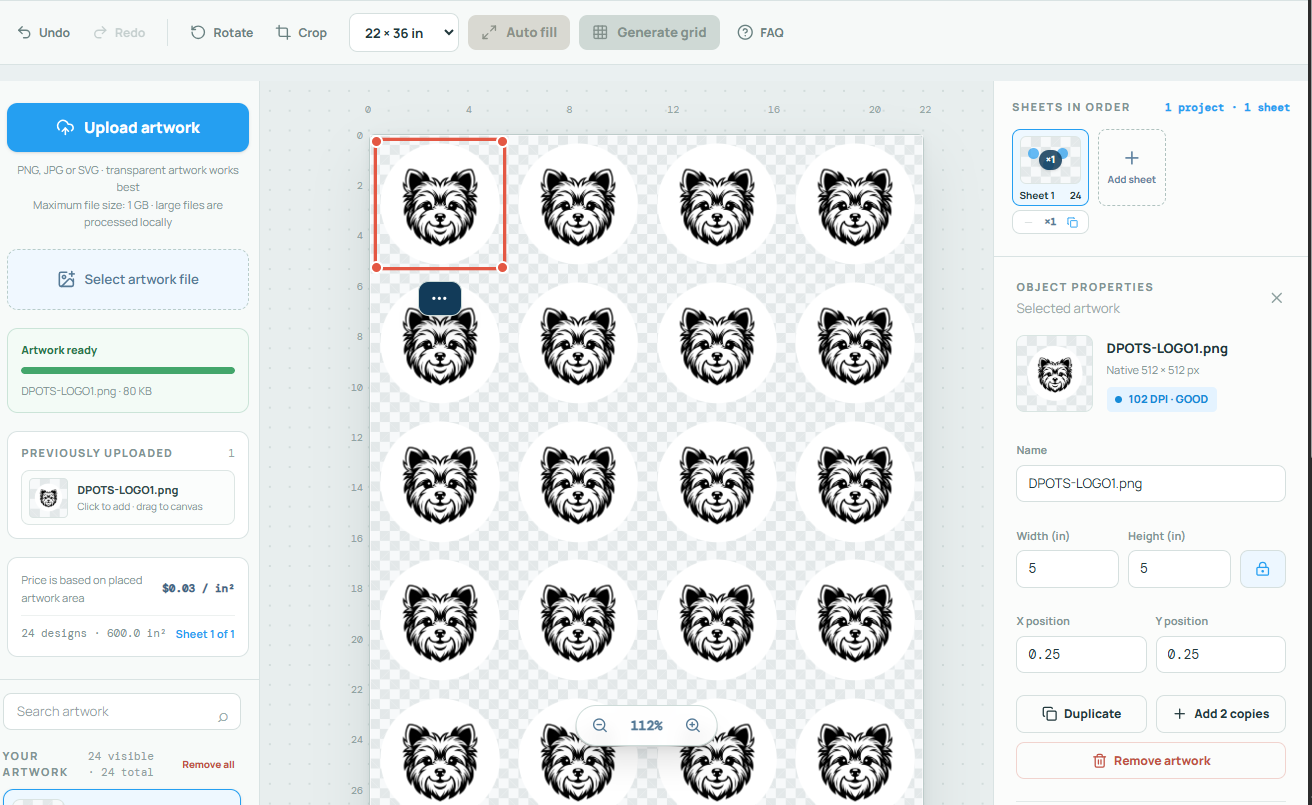
- Show step-by-step how to organize artwork using our online DTF Gang Sheet Builder, maximize printable area, avoid common file errors, and cut printing costs significantly.
2. Why Gang Sheets Are the Most Cost-Effective Choice
- Pay by the Foot/Meter, Not by the Logo: Instead of purchasing individual transfers, you pay for the roll size (e.g., 22.5″ x 24″, 22.5″ x 60″, 22.5″ x 120″).
- Mix and Match: Place adult front prints, youth back prints, neck tags, hat logos, and sleeve graphics all on a single sheet.
- Bulk Savings for Small Orders: Ideal for small clothing brand owners, event organizers, or print shops needing maximum profit margins.
3. Step-by-Step Guide to Building Your Gang Sheet Online
Prepare Your Artwork Files
- Ensure every design has a transparent background (PNG format).
- Check image resolution: Minimum 300 DPI at the actual size you want it printed to avoid pixelated or blurry prints.
- Convert color profiles to CMYK (or RGB with high contrast) for accurate color representation.
Choose Your Gang Sheet Size
- Estimate how many items you need and select the right roll length.
- Common standard sizes:
- 22.5″ x 24″ (Small batch / testing)
- 22.5″ x 60″ (Medium batch / 8–12 full-size front prints)
- 22.5″ x 120″ (Large batch / max volume savings)
Upload and Arrange Artwork in the Builder Tool
- Drag and drop PNG files into the Digital Prints On T-Shirts Gang Sheet Builder.
- Duplicate recurring logos with one click.
- Rotate and nest smaller graphics (like neck labels or pocket logos) inside unused gaps between larger designs.
- Pro-Tip: Keep at least a 0.25-inch gap between designs so they are easy to cut apart with scissors or a cutter.
Review Your Layout with the Auto-Checker
- Verify that no elements overlap or bleed past the printable margins.
- Check the built-in image resolution tool to make sure no graphics trigger a low-DPI warning.
Submit and Order
- Add the completed gang sheet to your cart, double-check print dimensions, and place the order with no minimum requirements.
Pro Tips to Maximize Space and Save Extra Money
- Fill Every Empty Gap: Never leave empty space—fill tiny gaps with neck labels, pocket prints, or free promo stickers.
- Duplicate Standard Sizes: Keep extra chest logos on hand for future quick orders.
- Double Check Transparent Pixels: Trim excess transparent space around your image boundary in Photoshop or Canva so you can align graphics tightly without overlapping.
Conclusion
- Conclusion: Building a DTF Gang Sheet is the ultimate hack to stretch your custom apparel budget, giving you total control over print layout and unit costs.
- “Ready to build your first sheet? Open our free online DTF Gang Sheet Builder on Digital Prints On T-Shirts now, upload your artwork, and watch your printing costs drop!”